
Push notifications from any script, server or webhook
Pocket Notifier turns just about anything into a push notification on your phone: a server, a cron job, a CI pipeline, a home-automation rule, a webhook. Create a notification group, copy its API key, and send one HTTP POST. There is nothing to install on the sending side.


Free to download: 100 notifications a month, 3 devices and 3 notification groups. Premium is a one-time purchase, no subscription. Requires iOS 17 or Android 8 or later.
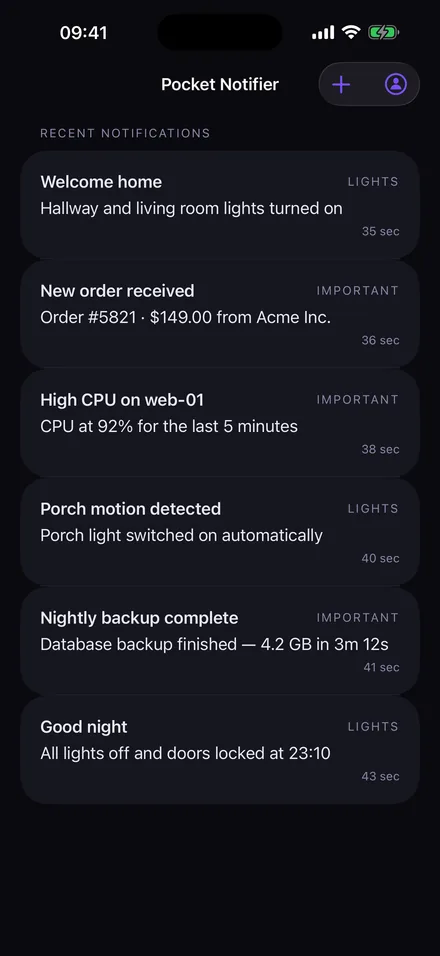
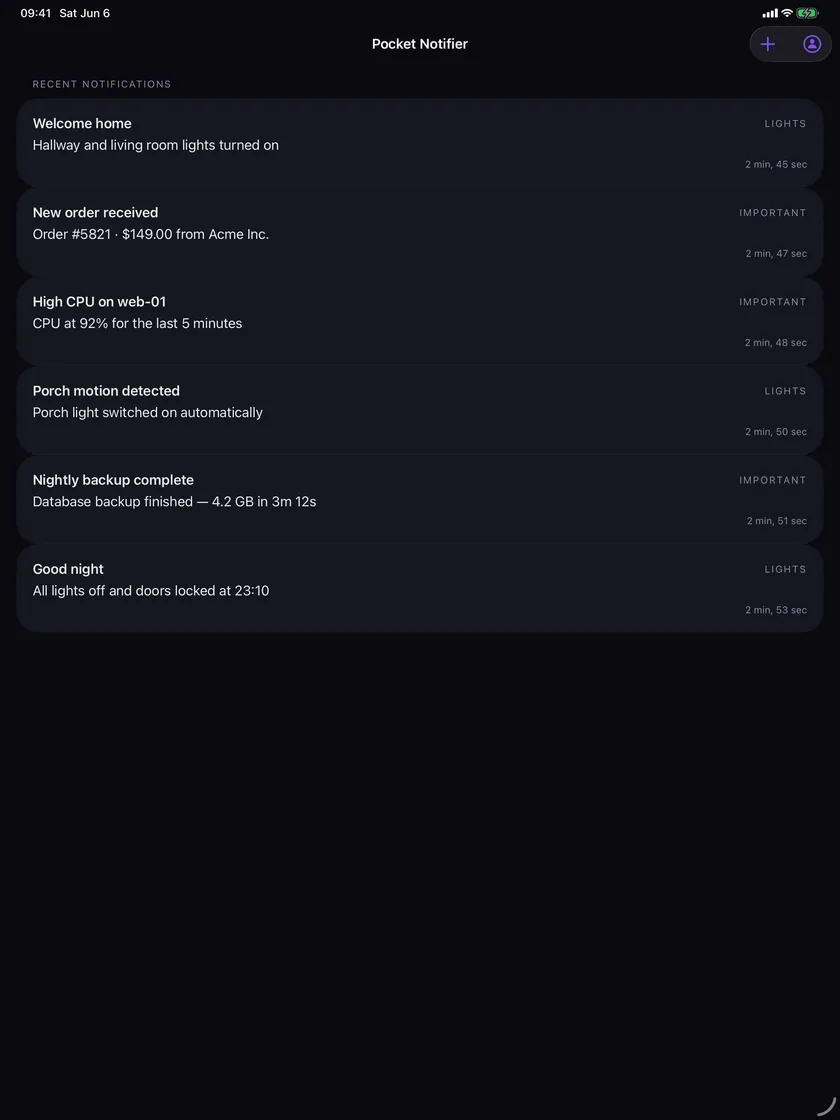
Every notification, kept and readable
The app keeps a history of what arrived, labelled with the group it came from and the time it landed. Swipe to delete one, clear them all, or pull to refresh. Mute a group on one device when you want quiet there and keep it loud on another.
Notifications you control
- Groups with their own keys
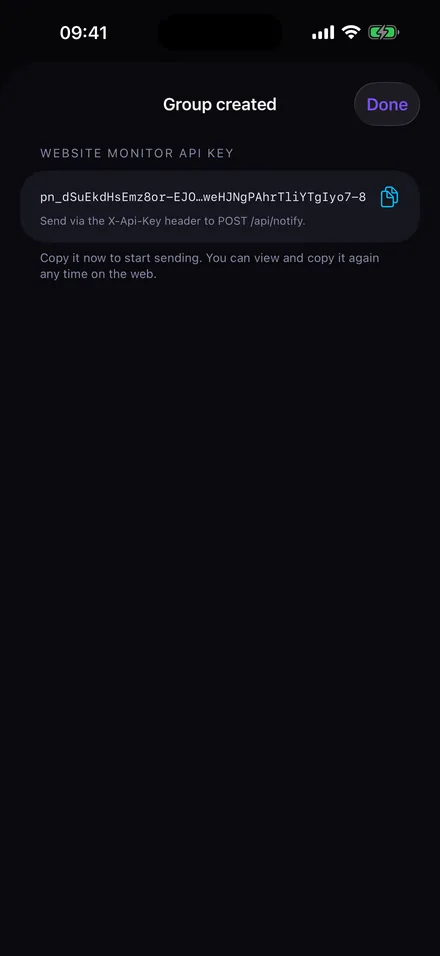
- Create a notification group per system or project. Each has its own API key, so you can rotate or revoke one without touching the rest.
- History and a widget
- Everything that arrived is listed in the app, and a home-screen widget on iPhone and Android shows the latest. History is optional: by default a notification is delivered and not kept on the server.
- Mute per device
- Silence a group on your phone at night and keep it active on the iPad in the office. Muting is per device, not per account.
- Priority levels
- Send quiet, normal or urgent. Quiet lands without a sound; urgent is delivered as Time Sensitive on iOS, so it breaks through Focus modes, and as an alarm-class notification on Android, so it sounds even on silent.
- Tap-through links
- Add a URL and the notification opens it when tapped: a dashboard, a log, a camera feed.
- Teams
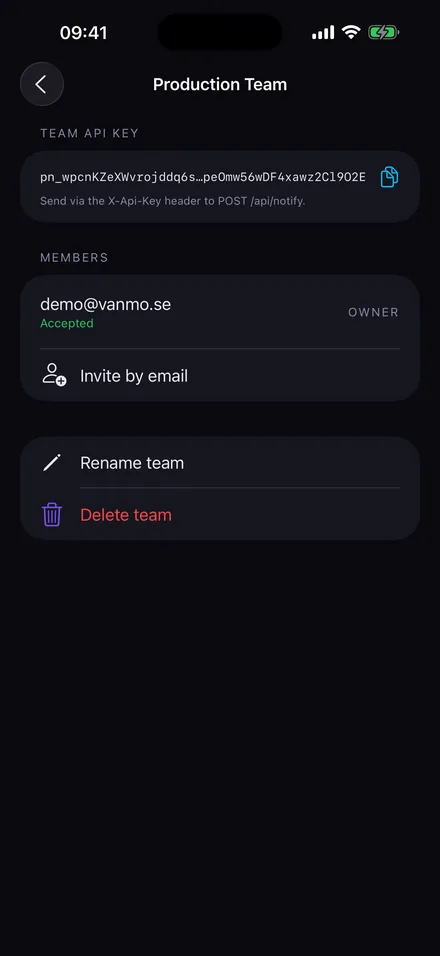
- Share a group with family or colleagues by email invitation. One POST reaches every member's devices, and the owner chooses who may send. Creating a team needs Premium; a free account can join one. See how teams are used.
- Manage it on the web
- Groups, API keys, devices and teams live at pocketnotifier.vanmo.se, so you can copy a key from any computer. A Test button on each group sends a sample and reports how many devices got it, without counting against your quota.
- Your data, in your hands
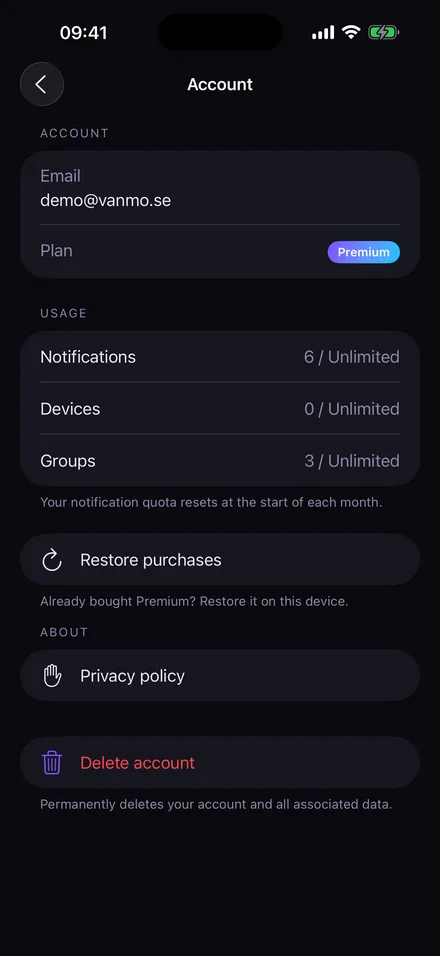
- Export everything as a zip of JSON files, change your password, sign out everywhere, or delete the account and all its data. All from the Account page, no email required.
- Free to start
- 100 notifications a month, 3 devices and 3 groups on the free plan. Premium is one purchase: unlimited notifications, devices and groups, plus Teams.
- Android too
- The same account and groups work in the Android app from Google Play.
Works with anything that can make an HTTP request
There is nothing to install where the notification comes from. If it can send an HTTP POST with a header and a bit of JSON, it can notify you.
- curl and shell scripts
- cron and systemd timers
- Python, Node.js, PowerShell
- GitHub Actions and GitLab CI
- Home Assistant (HACS integration)
- Uptime and health checks
- Proxmox, Unraid and NAS scripts
- Webhooks from any SaaS
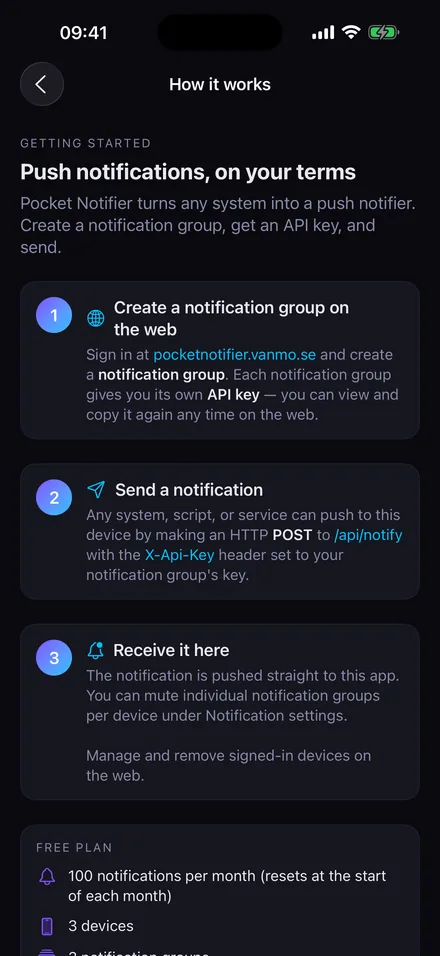
Set up in two minutes
-
Create a notification group
Sign in at pocketnotifier.vanmo.se or in the app, create a group and copy its API key. You can view and copy it again any time.
-
Send a notification
POST JSON to the notify endpoint with the key in the
X-Api-Keyheader.titleandbodyare the message and at least one of them is needed;urlandpriorityare optional.curl -X POST https://pocketnotifier.vanmo.se/api/notify \ -H "X-Api-Key: pn_your_group_key" \ -H "Content-Type: application/json" \ -d '{"title": "Backup finished", "body": "4.2 GB in 3 min 12 s", "url": "https://example.com/backups", "priority": "normal"}' -
Receive it
Install the app, sign in with the same account and allow notifications. Press Test on the group in the web app to check the route without spending a notification. Mute any group per device under Notification settings.
Send from your language
Every example does the same thing: one HTTPS POST to the notify endpoint, the group's key in the X-Api-Key header and a small JSON body. Keep the key out of the code; the examples read it from an environment variable called POCKET_NOTIFIER_KEY.
| Field | Required | What it does |
|---|---|---|
title | One of the two | The bold first line of the notification. Up to 200 characters. |
body | One of the two | The message text. Up to 2,000 characters. |
url | No | Opened when the notification is tapped: a dashboard, a log, a camera. Must be an absolute http or https address. |
priority | No | quiet, normal (default) or urgent. Quiet lands silently in the list. Urgent is Time Sensitive on iOS and breaks through Focus; on Android it is alarm-class, so it sounds on silent and gets through Do Not Disturb when alarms are allowed. true is shorthand for urgent. |
Longer text is cut, not refused, and the whole request body is capped at 16 KB. The service answers as soon as the notification is queued, so a script is never held up by the push round trip.
Python
import json, os, urllib.request

req = urllib.request.Request(
    "https://pocketnotifier.vanmo.se/api/notify",
    data=json.dumps({
        "title": "Backup finished",
        "body": "4.2 GB in 3 min 12 s",
        "url": "https://example.com/backups",
        "priority": "normal",
    }).encode(),
    headers={
        "X-Api-Key": os.environ["POCKET_NOTIFIER_KEY"],
        "Content-Type": "application/json",
    },
    method="POST",
)
with urllib.request.urlopen(req) as res:
    print(res.status)  # 2xx means it was accepted
JavaScript (Node.js 18+ or the browser)
const res = await fetch("https://pocketnotifier.vanmo.se/api/notify", {
  method: "POST",
  headers: {
    "X-Api-Key": process.env.POCKET_NOTIFIER_KEY,
    "Content-Type": "application/json",
  },
  body: JSON.stringify({
    title: "Backup finished",
    body: "4.2 GB in 3 min 12 s",
    url: "https://example.com/backups",
    priority: "normal",
  }),
});
if (!res.ok) throw new Error(`Pocket Notifier answered ${res.status}`);
C# (.NET)
using System.Net.Http.Json;

using var client = new HttpClient();
client.DefaultRequestHeaders.Add("X-Api-Key",
    Environment.GetEnvironmentVariable("POCKET_NOTIFIER_KEY"));

var response = await client.PostAsJsonAsync(
    "https://pocketnotifier.vanmo.se/api/notify",
    new
    {
        title = "Backup finished",
        body = "4.2 GB in 3 min 12 s",
        url = "https://example.com/backups",
        priority = "normal"
    });

response.EnsureSuccessStatusCode();
Go
package main

import (
	"bytes"
	"encoding/json"
	"net/http"
	"os"
)

func main() {
	payload, _ := json.Marshal(map[string]string{
		"title":    "Backup finished",
		"body":     "4.2 GB in 3 min 12 s",
		"url":      "https://example.com/backups",
		"priority": "normal",
	})
	req, _ := http.NewRequest(http.MethodPost,
		"https://pocketnotifier.vanmo.se/api/notify", bytes.NewReader(payload))
	req.Header.Set("X-Api-Key", os.Getenv("POCKET_NOTIFIER_KEY"))
	req.Header.Set("Content-Type", "application/json")

	res, err := http.DefaultClient.Do(req)
	if err != nil {
		panic(err)
	}
	defer res.Body.Close()
	// res.StatusCode is 2xx when the notification was accepted
}
Java (11+)
import java.net.URI;
import java.net.http.HttpClient;
import java.net.http.HttpRequest;
import java.net.http.HttpResponse;

var json = """
    {"title": "Backup finished",
     "body": "4.2 GB in 3 min 12 s",
     "url": "https://example.com/backups",
     "priority": "normal"}
    """;

var request = HttpRequest.newBuilder(URI.create("https://pocketnotifier.vanmo.se/api/notify"))
    .header("X-Api-Key", System.getenv("POCKET_NOTIFIER_KEY"))
    .header("Content-Type", "application/json")
    .POST(HttpRequest.BodyPublishers.ofString(json))
    .build();

var response = HttpClient.newHttpClient()
    .send(request, HttpResponse.BodyHandlers.ofString());
System.out.println(response.statusCode());
PHP
<?php
$context = stream_context_create(["http" => [
    "method"  => "POST",
    "header"  => "X-Api-Key: " . getenv("POCKET_NOTIFIER_KEY") . "\r\n"
               . "Content-Type: application/json\r\n",
    "content" => json_encode([
        "title"    => "Backup finished",
        "body"     => "4.2 GB in 3 min 12 s",
        "url"      => "https://example.com/backups",
        "priority" => "normal",
    ]),
]]);

file_get_contents("https://pocketnotifier.vanmo.se/api/notify", false, $context);
PowerShell
$body = @{
  title    = "Backup finished"
  body     = "4.2 GB in 3 min 12 s"
  url      = "https://example.com/backups"
  priority = "normal"
} | ConvertTo-Json

Invoke-RestMethod -Method Post -Uri "https://pocketnotifier.vanmo.se/api/notify" `
  -Headers @{ "X-Api-Key" = $env:POCKET_NOTIFIER_KEY } `
  -ContentType "application/json" -Body $body
Shell script and cron
#!/bin/sh
# Reusable helper: notify "Title" "Body" [quiet|normal|urgent]
notify() {
  curl -sS -X POST https://pocketnotifier.vanmo.se/api/notify \
    -H "X-Api-Key: $POCKET_NOTIFIER_KEY" \
    -H "Content-Type: application/json" \
    -d "{\"title\": \"$1\", \"body\": \"$2\", \"priority\": \"${3:-normal}\"}"
}

if /usr/local/bin/backup.sh; then
  notify "Backup finished" "Nightly backup completed"
else
  notify "Backup failed" "Check the log on the NAS" urgent
fi

# crontab: run it every night at 03:00
# 0 3 * * * POCKET_NOTIFIER_KEY=pn_xxx /usr/local/bin/backup-and-notify.sh
GitHub Actions
- name: Notify on failure
  if: failure()
  run: |
    curl -sS -X POST https://pocketnotifier.vanmo.se/api/notify \
      -H "X-Api-Key: ${{ secrets.POCKET_NOTIFIER_KEY }}" \
      -H "Content-Type: application/json" \
      -d '{"title": "CI failed",
           "body": "${{ github.repository }} on ${{ github.ref_name }}",
           "url": "${{ github.server_url }}/${{ github.repository }}/actions/runs/${{ github.run_id }}",
           "priority": "urgent"}'
What comes back
A successful POST answers with the notification's id and the number of accounts it was queued for: one for a personal group, the accepted member count for a team.
{"id": "6f1c2e8a-4b0d-4f6e-9c2a-1d3e5f7a9b0c", "recipients": 1}| Status | Meaning |
|---|---|
200 | Queued for delivery. |
400 | Neither title nor body was sent, or url is not an absolute http(s) address. |
401 | The API key is missing or invalid. |
402 | The free plan's monthly limit is used up. The response names the limit; you also get one email about it per month. |
403 | A team key whose member may no longer send, or whose account is not Premium. |
429 | More than 60 requests in 10 seconds on one key. Wait for the Retry-After header. |
Home Assistant integration
Home Assistant can call the API with a rest_command, but the open-source PocketNotifier integration makes it native: every notification group you add becomes a notify.<name> action, usable in automations, scripts, blueprints and the Send a notification dialog, with the tap-through URL and the priority passed straight through.
Install it
-
Add the repository to HACS
In HACS open the three-dot menu, choose Custom repositories, add
https://github.com/trdle/Pocket-notifier-hawith the category Integration, then install PocketNotifier and restart Home Assistant. -
Add a channel per notification group
Go to Settings, Devices & Services, Add Integration and search for PocketNotifier. Enter a channel name and the group's API key. The name becomes the action: Household turns into
notify.household. Repeat for every group or team you want to reach. -
Try it
In Developer tools, Actions, pick the new action and send a test. The key is not checked when you add the channel, so a wrong key shows up here as a delivery error in the log.
How the fields map
| In the notify action | Sent to Pocket Notifier |
|---|---|
title | The notification title |
message | The body |
data.url | Tap-through link, optional |
data.priority | quiet, normal or urgent, optional. true is shorthand for urgent. |
Someone at the door, with the camera one tap away
automation:
  - alias: "Doorbell"
    trigger:
      - platform: state
        entity_id: binary_sensor.doorbell
        to: "on"
    action:
      - action: notify.household
        data:
          title: "Doorbell"
          message: "Someone is at the front door"
          data:
            url: "https://my.home-assistant.io/lovelace/cameras"
The washing machine is done
A smart plug reports power. When it drops under 5 W for two minutes, the cycle is over.
automation:
  - alias: "Washing machine finished"
    trigger:
      - platform: numeric_state
        entity_id: sensor.washing_machine_power
        below: 5
        for: "00:02:00"
    action:
      - action: notify.household
        data:
          title: "Laundry"
          message: "The washing machine has finished"
A leak that has to get through Focus
Urgent is delivered as Time Sensitive on iOS, so it shows even when Do Not Disturb is on.
automation:
  - alias: "Water leak"
    trigger:
      - platform: state
        entity_id: binary_sensor.kitchen_leak
        to: "on"
    action:
      - action: notify.household
        data:
          title: "Water leak in the kitchen"
          message: "The sensor under the dishwasher is wet"
          data:
            priority: urgent
            url: "https://my.home-assistant.io/lovelace/water"
A quiet nightly summary
Quiet lands in the list without a sound or a banner.
automation:
  - alias: "Nightly summary"
    trigger:
      - platform: time
        at: "22:30:00"
    action:
      - action: notify.living_room
        data:
          title: "Good night"
          message: "Doors locked, lights off, heating set to 18°"
          data:
            priority: quiet
Point an automation at a team's channel instead of a personal group and the whole household gets it. The integration is open source: trdle/Pocket-notifier-ha on GitHub.
Teams: one message, everyone who should know
A team is a notification group shared with other people. You invite members by email, they accept in the app or on the web, and anything sent with a team key reaches every member's devices. The owner decides who may send: each member with send permission gets a key of their own, so removing someone revokes only theirs and nobody else has to change anything. Invitations expire after seven days. No shared account, no group chat to scroll past. Creating a team and sending to it need Premium; a free account can join one team and receive.
- The family
- A new home video lands in the Family library on Plex. Tautulli's webhook agent, or Jellyfin's webhook plugin, posts to the Family team: "Summer 2026, lake trip, is ready to watch". Everyone sees it, nobody has to be told, and the link opens the library.
- The household
- Home Assistant sends to the Household team: the washing machine is done, someone is at the door, the garage was still open at 23:00. Things only one person cares about stay in a personal group, which can be muted per device.
- A small ops team
- Monitoring and CI post to the Production team. Urgent breaks through Focus for whoever is on call; the others read it in the morning. A new colleague gets an invitation, a leaver is removed and their key stops working, and nobody else's key changes.
- A club or a class
- The coach runs a Shortcut that posts "Practice cancelled, pitch flooded" to the Under-9s team and every parent has it in seconds. Shortcuts can send the POST directly with Get Contents of URL.
The Plex example, as a Tautulli webhook
In Tautulli add a Webhook notification agent for the "Recently added" trigger, set the URL to https://pocketnotifier.vanmo.se/api/notify, add the headers X-Api-Key and Content-Type: application/json, and use a JSON body like this. Tautulli fills in the placeholders.
{
  "title": "New family video",
  "body": "{title} ({year}) is ready to watch",
  "url": "https://plex.example.com/library/family",
  "priority": "quiet"
}
Pocket Notifier or email alerts?
Email works until it does not: it lands in a tab you are not looking at, gets filtered, or arrives late. A push notification is the thing your phone was built to show you.
| From a script | Pocket Notifier | Email alerts |
|---|---|---|
| Arrives on your phone in seconds | Yes | Whenever mail syncs |
| One line to send | Yes | SMTP account, credentials, a library |
| Mute at night, per device | Yes | No |
| Reach a whole team at once | Yes, with Teams | Forwarding rules |
| Something to host or maintain | No | A mail account at least |
Frequently asked questions
Do I need to run a server?
No. Pocket Notifier is a hosted relay. Your script sends one HTTP POST to pocketnotifier.vanmo.se and the service pushes it to your devices through Apple's and Google's push networks. Nothing is installed on the sending side.
What is included in the free plan?
100 notifications a month, 3 devices, 3 notification groups and membership of one team. The counter resets at the start of each month, and you get one email when it runs out. Test sends from the web app do not count.
What does Premium include, and is it a subscription?
Premium is a one-time purchase, not a subscription. It removes the limits on notifications, devices and groups and adds Teams. Buy it in the app, and use Restore purchases on the Account screen to activate it on another device.
Does it work with Home Assistant?
Yes. A HACS integration turns each notification group into a native notify action, with optional URL and priority fields. It uses the same API as everything else.
Is there an Android app?
Yes. Pocket Notifier is on Google Play as well, and one account works on both platforms with the same groups and API keys.
Are my notifications stored?
By default a notification is delivered and not kept on the server. If you turn history on, it is stored so you can read it later in the app. There are no analytics or advertising trackers. The Account page exports everything as a zip of JSON files or deletes the account and all its data. See the privacy policy.
Can a notification open a link?
Yes. Include a url field in the request and the notification opens that link when tapped: a dashboard, a log, a camera feed.
What are the priority levels?
quiet, normal and urgent. Quiet arrives silently in the list, normal is the default with a banner and sound, and urgent is delivered as Time Sensitive on iOS so it comes through Focus modes. On Android urgent is an alarm-class notification: its sound plays even when the phone is on silent and it gets through Do Not Disturb whenever alarms are allowed. A boolean true is accepted as shorthand for urgent.
I am not receiving notifications. What should I check?
Make sure the app has notification permission in your device settings, that you are signed in on that device, that the group is not muted there, and that you have not hit the monthly limit on the free plan. Press Test on the group in the web app: it sends a sample, waits for delivery and reports how many devices received it, without counting against your quota. Still stuck? Email support@vanmo.se.
I lost an API key.
Open the notification group on the web or in the app and copy the key again. Delete and recreate the group if you want a fresh one.
How do Teams work?
A team is a shared notification group. The owner invites members by email, they accept in the app or on the web, and anything sent with a team key reaches every member's devices. The owner decides who may send: each member with send permission gets a key of their own, so removing someone revokes only theirs. Invitations expire after seven days. Creating a team and sending to it need Premium; a free account can join one team.
What does the API return, and is there a rate limit?
A successful POST answers 200 with the notification's id and the number of accounts it was queued for. 400 means neither title nor body was sent or the url is not an absolute http(s) address, 401 a missing or invalid key, 402 the free plan's monthly limit, 403 a team key without send permission, and 429 more than 60 requests in 10 seconds on one key, with a Retry-After header. The full table is under Send from your language.
Can I send from a language or tool that is not listed?
Yes. Anything that can make an HTTPS POST with a header and a JSON body works: a shell one-liner, a Shortcut on iPhone, a webhook from a SaaS, or any language with an HTTP client.
Get Pocket Notifier
Free on the App Store and Google Play. Premium is a one-time purchase.